Screenshots of Auto Key Presser named Auto Keyboard by MurGee.com
Automate keystroke pressing with an appropriate Auto Key Presser. This screenshots page displays various ways in which you can automate key pressing. You can auto-press and release single or multiple keystrokes, or even record and playback manual keyboard actions. This free-to-try keyboard automation utility runs on the latest Microsoft operating systems like Windows 11, Windows 10, etc., on both 32-bit and 64-bit versions of Windows.
Download digitally signed Auto Key Presser, named Auto Keyboard by MurGee.com, and try it for free on your Windows 11, Windows 10, or other recent Microsoft Windows computer. You can alternatively view the screenshots and get an idea of what supporting keyboard automation features are available in this free-to-try software download.
To read more about the features offered, you can navigate to the Auto Key Presser home page and find out how you can easily automate keyboard actions for repetitive and tedious tasks.

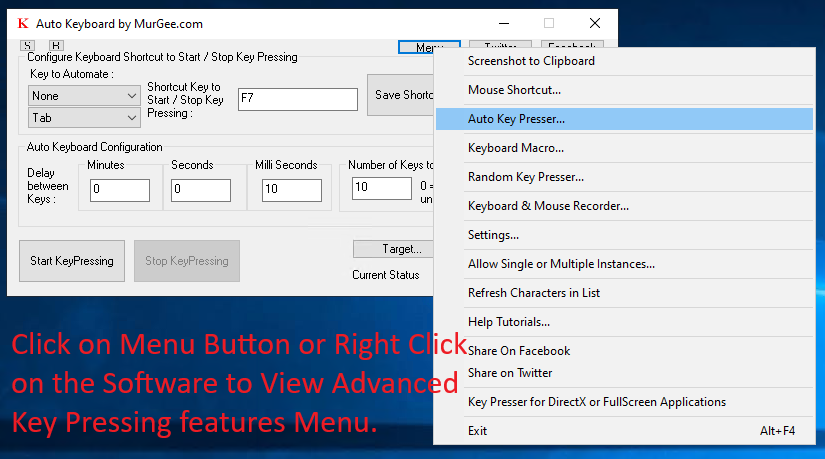
Menu displaying Advanced Features of Auto Key Presser
To launch Menu to invoke / launch other features, you can right click on the main screen of the Auto Key Presser. You can alternatively click on Menu button at the top of the main screen of the software.
Advanced Auto Key Presser
The Advanced Auto Key Presser feature allows you to simulate selected keystroke single or multiple times onto active application window. You can even enable random time delay between each simulated keystroke and control the keystroke simulation with global keyboard shortcut. You can configure multiple keyboard shortcuts to simulate selected keystrokes with configurable time interval.

Keyboard Macro
With Keyboard Macro feature, you can record Keystrokes and Replay them back with a Global Keyboard Shortcut. When playing back, you can even repeat the playback single or multiple times. The main interface of Keyboard Macro displays all the recorded keys so that you can view and edit basic parameters of each recorded key down and key up actions.

Random Key Presser
Pressing and releasing of Random Keystroke at configurable fixed or random time duration can be achieved with Random Key Presser feature. Depending on your purpose of pressing and releasing random keystroke, you can select single or multiple keystrokes from the available list of keystrokes. Repetition of pressing keystrokes can be done finite or infinite times and can be controlled with a configurable shortcut key.

Keyboard and Mouse Recorder
To Record Keystrokes and Mouse Actions to automate a repetitive task, you can use Keyboard and Mouse Recorder. It allows you to control recording and playback of recorded actions with Global Keyboard shortcut which can be used when using any other application. Playback speed and number of times, you wish to playback the recorded Mouse / Keyboard Actions is also configurable.
